Packaging a Python CLI with Console Scripts - 5/9
Packaging a Python CLI with setup.py, a src layout, dependencies, and an installable console entry point.
The Bash installer worked by encoding one installation procedure. Python packaging uses a stronger abstraction: the project declares its metadata, dependencies, build backend, and command entry points, while compatible tools decide how to build and install it.
This moves us from “run my script” to “install this Python distribution.” The distinction matters because the distribution has a name, a version, dependency requirements, and a standard artifact format.
Series
- From a Script to a Command-Line Tool
- When
sys.argvStops Scaling - Designing a CLI with
argparse - Why a Bash Installer Becomes a Liability
- Packaging a Python CLI with Console Scripts
- Testing a Python CLI and Automating CI
- Documentation as Part of the Product
- Building a Reliable PyPI Release Pipeline
- Publishing a Pure-Python CLI with Conda
Give the project a package layout
We will move the CLI code into an importable package under src:
tinyhttpie/
├── README.md
├── setup.py
├── src/
│   └── tihttp/
│       ├── __init__.py
│       └── cli.py
└── tests/
The src layout prevents the repository root from being imported accidentally during development. Tests exercise the installed package, which catches missing-package and installation mistakes earlier.
The build_parser(), main(), and run() functions from part 3 now live in src/tihttp/cli.py.
Describe the package with setup.py
The setup file is the package’s contract with setuptools and pip. It combines descriptive metadata with the information needed to discover, install, and invoke the application:
from pathlib import Path

from setuptools import find_packages, setup


setup(
    name="tihttp",
    version="0.1.0",
    description="A small command-line HTTP client",
    long_description=Path("README.md").read_text(encoding="utf-8"),
    long_description_content_type="text/markdown",
    license="MIT",
    python_requires=">=3.6",
    package_dir={"": "src"},
    packages=find_packages(where="src"),
    install_requires=[
        "requests>=2.21",
    ],
    extras_require={
        "dev": ["pytest", "tox", "twine", "wheel"],
        "docs": ["sphinx", "sphinx-rtd-theme"],
    },
    entry_points={
        "console_scripts": [
            "tihttp=tihttp.cli:run",
        ],
    },
)
These fields describe different contracts:
python_requiresprevents installation on unsupported interpreters.package_dirandfind_packages()tell setuptools where the importable code lives.install_requireslists dependencies needed when the command runs.extras_requiregroups development and documentation tools without installing them for every user.console_scriptsmaps the publictihttpcommand to therun()function.
Because setup.py is executable Python, it is tempting to place application logic in it. Keeping it declarative and side-effect free makes builds easier to understand and reproduce.
The entry point is the important bridge. Users no longer need to know the source filename, module layout, interpreter path, or virtual-environment location. The installer generates the platform-appropriate launcher.
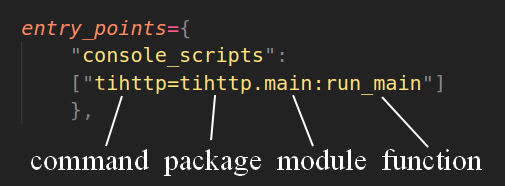
An entry point connects the command name to a package, module, and function.
Install for use or development
A regular installation copies the package into the active environment and installs its dependencies and command:
$ python -m pip install .
$ tihttp --help
During development, an editable install keeps imports and the console script connected to the working tree:
$ python -m pip install --editable '.[dev]'Editable installation is a development convenience, not a different release artifact. A release should still be built and tested in the form users will install.
Build standard distribution artifacts
Setuptools can create a source distribution, while the wheel package adds the wheel build command:
$ python -m pip install wheel
$ python setup.py sdist bdist_wheel

Successfully built tihttp-0.1.0.tar.gz and tihttp-0.1.0-py3-none-any.whl
The source distribution contains the material needed to build the project. The wheel is an installable archive and avoids running the project’s build process on the user’s machine.
This separation is one of the strengths of the Python ecosystem: project metadata, build frontend, build backend, installer, and package index are distinct pieces with documented interfaces. A small project can use the simple path without inventing its own distribution protocol.
Next, we need evidence that the installed command behaves correctly across supported environments. Part 6 adds tests and continuous integration.