How to Cheaply Host Your Full-Stack Side Project: Serving It from Home
Hosting a stateful full-stack side project on one home server with Docker Compose, Traefik, dynamic DNS, HTTPS, and a realistic recovery plan.
Revision note: I originally published this article in 2023. I have since revised the prose, corrected the deployment examples, and updated the IMDb Clone screenshot. The architecture described here intentionally remains the original, simple setup: Docker Compose, Traefik, dynamic DNS, and router port forwarding. The project later moved to K3s and GitOps; the follow-up article explains why that additional machinery earned its place.
A static frontend is easy to place on a CDN. A full-stack application has a larger operational footprint: backend code must run somewhere, state must survive deployments, media needs storage, and public traffic needs a secure route into the system.
A home server can provide all of that without a recurring compute bill, but it is not free hosting. It replaces part of the cloud invoice with hardware, electricity, a domain, backup storage, residential-network constraints, and your own time as operator. For a side project, that can still be a good trade—especially when operating the application is part of what you want to learn.
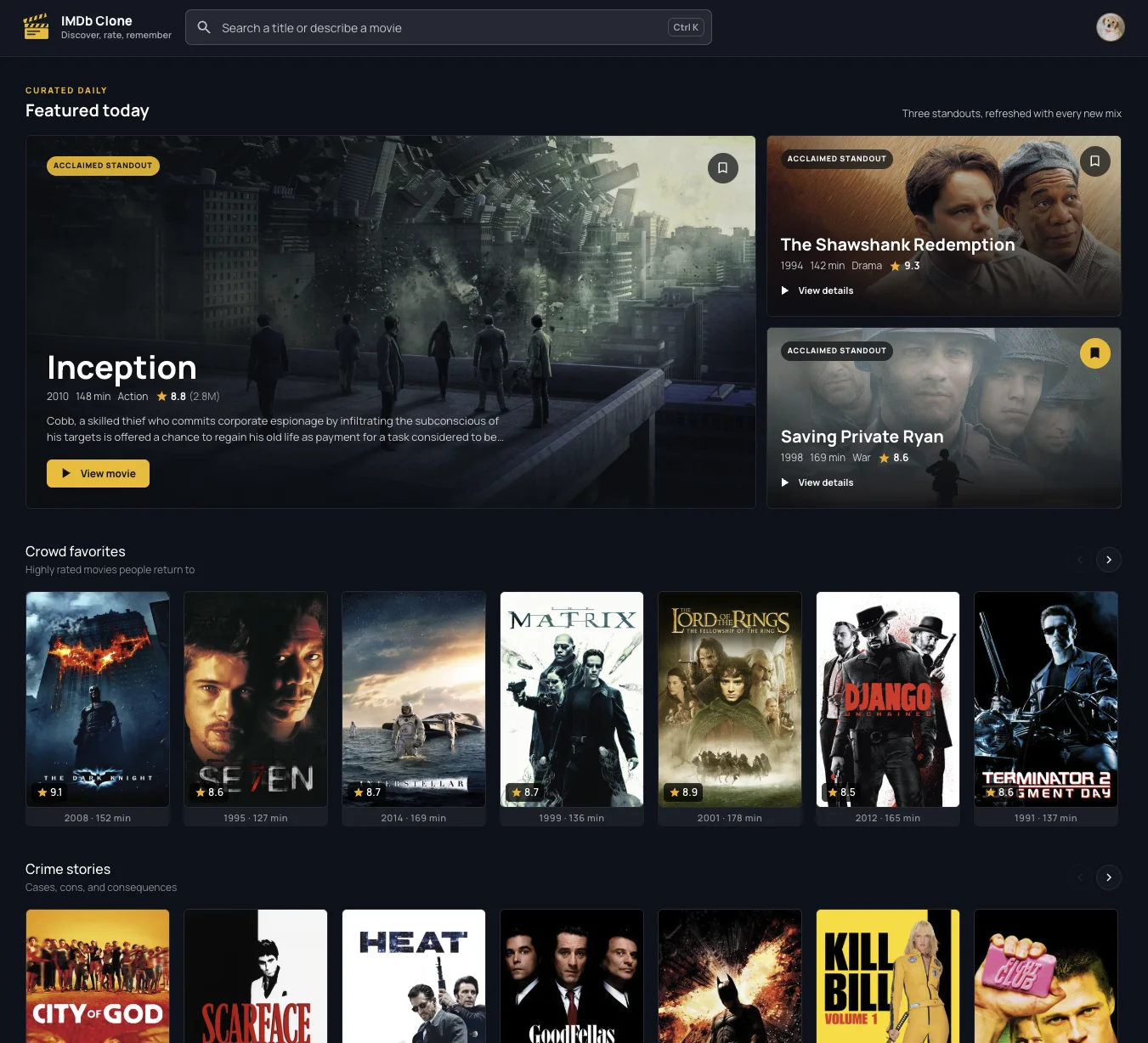
This is the current version of my IMDb Clone. The application has evolved since 2023, but the original home-server deployment is the subject of this article.
The deployment in one diagram
The original system ran seven containers on one Ubuntu machine: a React frontend, a Spring Boot backend, MySQL, Elasticsearch, MinIO, a small MinIO initialization job, and Traefik.
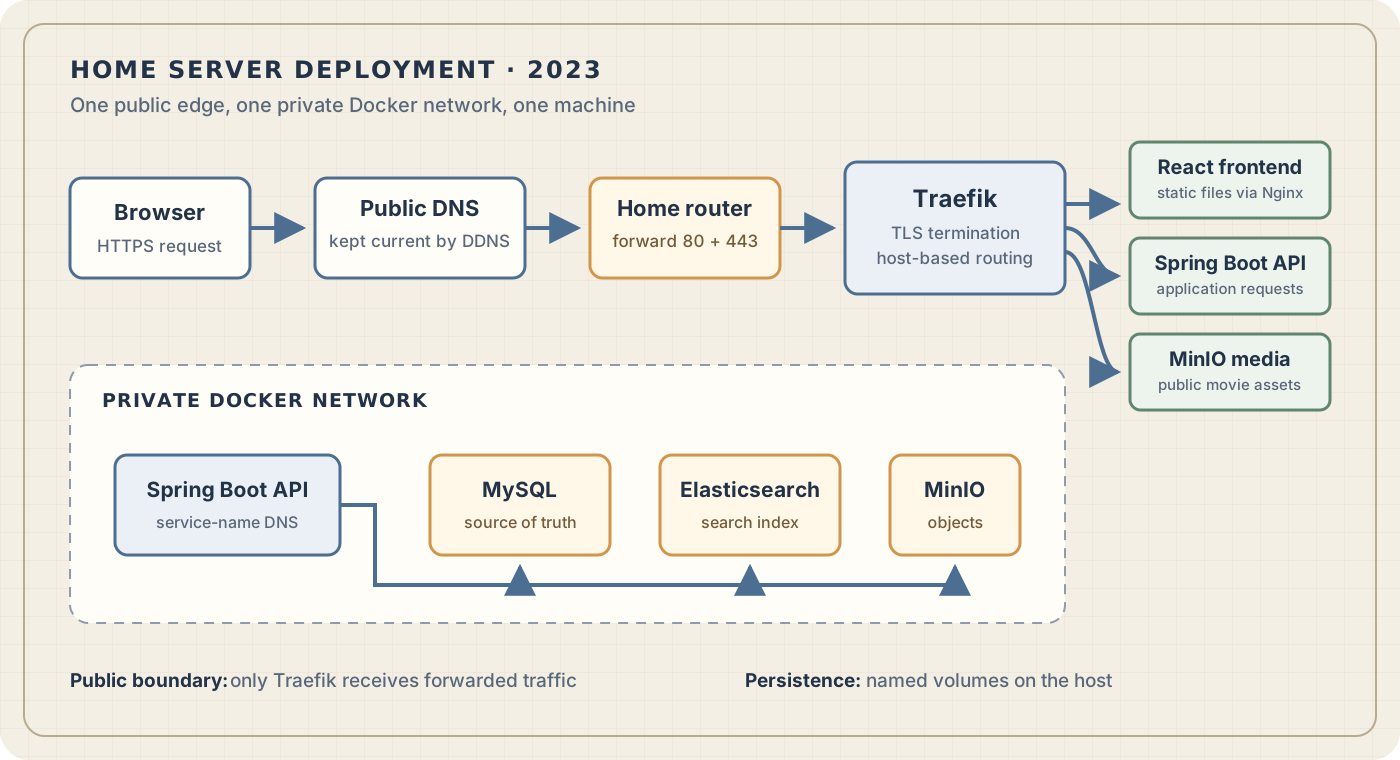
There are two boundaries worth noticing:
- The router forwards only HTTP and HTTPS traffic to Traefik. Database, search, object-storage administration, and backend ports do not need to be public.
- Containers communicate over a private Docker network using service names rather than fixed IP addresses.
The simplicity is deliberate. One machine means one failure domain and Compose means one host to operate, but it also keeps the system understandable.
1. Choose hardware for the workload
You do not need server-grade hardware for a lightly used side project. An old desktop, a small x86 mini PC, or a sufficiently capable single-board computer can work. The important question is whether it fits the actual workload.
I used a Minisforum UM560 running Ubuntu Server.

For this application, memory and storage mattered more than peak CPU performance. Elasticsearch reserved a JVM heap, MySQL and the Spring Boot backend needed predictable memory, and the movie images consumed persistent storage. I also preferred wired Ethernet over Wi-Fi and assigned the server a stable LAN address so the router would not forward traffic to the wrong device after a DHCP change.
Power consumption belongs in the calculation:
annual kWh = average watts × 24 × 365 ÷ 1000
annual cost = annual kWh × electricity price per kWh
A machine averaging 25 watts consumes about 219 kWh per year. A fair comparison with cloud hosting should also include hardware amortization, replacement storage, a domain, off-machine backups, and maintenance time.
2. Package the application as release artifacts
Containers made the application deployable as a set of explicit artifacts instead of a collection of tools installed directly on the server. The backend image was built with Gradle and ran on a smaller JRE base image:
FROM gradle:8.0.2-jdk19-jammy AS build
WORKDIR /workspace
COPY --chown=gradle:gradle . .
RUN gradle bootJar --no-daemon

FROM eclipse-temurin:19-jre-jammy
WORKDIR /app
RUN groupadd --system --gid 10001 appuser \
  && useradd --system --uid 10001 --gid appuser appuser
COPY --from=build --chown=appuser:appuser \
  /workspace/build/libs/*.jar /app/application.jar
USER appuser
EXPOSE 8080
ENTRYPOINT ["java", "-jar", "/app/application.jar"]
This is a multi-stage build: Gradle and the source tree exist only in the build stage, while the final image contains the JRE and the application JAR. Running as a dedicated non-root user also limits the privileges of the application process.
The frontend followed the same idea. Node built the React application, then Nginx served only the generated static files. CI published both images to a registry so the home server only needed Docker and the Compose configuration; it did not need the source repository or a local Java/Node toolchain.
An image tag is part of the release contract. The original pipeline published latest as well as a tag derived from the Git commit. latest is convenient, but it is mutable and does not answer which build is running. A commit or release tag makes deployments and rollbacks much easier to reason about.
3. Use Compose to make boundaries visible
I kept stateful and stateless services in separate Compose files. MySQL, Elasticsearch, and MinIO usually remain running while the frontend or backend is replaced. Separating those lifecycles reduces the chance that an application deployment unnecessarily restarts the data layer.
The following excerpt shows the important topology without reproducing every application setting:
services:
  traefik:
    image: traefik:v2.10
    restart: unless-stopped
    command:
      - "--providers.docker=true"
      - "--providers.docker.exposedbydefault=false"
      - "--entrypoints.web.address=:80"
      - "--entrypoints.web.http.redirections.entrypoint.to=websecure"
      - "--entrypoints.websecure.address=:443"
      - "--certificatesresolvers.letsencrypt.acme.tlschallenge=true"
      - "--certificatesresolvers.letsencrypt.acme.storage=/letsencrypt/acme.json"
    ports:
      - "80:80"
      - "443:443"
    volumes:
      - "/var/run/docker.sock:/var/run/docker.sock:ro"
      - "./letsencrypt:/letsencrypt"
    networks:
      - public

  frontend:
    image: registry.example/imdb-frontend:${APP_VERSION}
    restart: unless-stopped
    networks:
      - public
    labels:
      - "traefik.enable=true"
      - "traefik.http.routers.frontend.rule=Host(`movies.example.com`)"
      - "traefik.http.routers.frontend.entrypoints=websecure"
      - "traefik.http.routers.frontend.tls.certresolver=letsencrypt"

  backend:
    image: registry.example/imdb-backend:${APP_VERSION}
    restart: unless-stopped
    networks:
      - public
      - data
    labels:
      - "traefik.enable=true"
      - "traefik.http.routers.backend.rule=Host(`api.movies.example.com`)"
      - "traefik.http.routers.backend.entrypoints=websecure"
      - "traefik.http.routers.backend.tls.certresolver=letsencrypt"

  mysql:
    image: mysql:8
    restart: unless-stopped
    networks:
      - data
    volumes:
      - mysql-data:/var/lib/mysql

networks:
  public:
  data:
    internal: true

volumes:
  mysql-data:
Compose gives services DNS names on their shared network, so the backend can connect to mysql:3306 instead of depending on a container IP. The data network is marked internal, and MySQL has no host-published port. The same principle applies to Elasticsearch and MinIO unless there is a specific reason to expose them.
This is stricter than my first version of the Compose files, which published several stateful ports on the host for convenience. Host publishing is not the same as router forwarding, but it still widens the local attack surface. A production composition should publish only the ports that must cross a boundary.
Named volumes preserve data when a container is replaced. They do not protect data from disk failure, accidental deletion, corruption, or loss of the machine. Persistence and backup solve different problems.
Compose can control startup order and can wait for a dependency’s health check, but starting in order is not the same as being operationally ready. The backend should still handle temporarily unavailable dependencies with bounded retries and clear errors.
4. Trace the public request path
Making a service reachable from a residential connection requires four independent layers to agree.
Dynamic DNS
Residential public IP addresses can change. A dynamic DNS updater periodically checks the current address and updates a DNS record when necessary. I used ddclient with my DNS provider.
The updater’s credential should be narrowly scoped, stored outside the repository, readable only by the service account, and rotated if it ever enters Git history. Removing a secret from the current file does not remove it from previous commits.
You can expose the DDNS hostname directly or point an application hostname at it, depending on what the DNS provider supports. The important invariant is simple: the hostname users open must eventually resolve to the router’s current public address.
Port forwarding
The router forwarded TCP ports 80 and 443 to the server’s stable LAN address. It did not need forwarding rules for port 8080, MySQL, Elasticsearch, or the MinIO console. Traefik was the only public entry point.
This conventional setup requires a publicly reachable address. If the ISP places the connection behind carrier-grade NAT or blocks inbound traffic, a router rule alone cannot make the server reachable; a tunnel, relay, or different ISP arrangement is required.
Reverse proxy and HTTPS
Traefik watched Docker metadata and created routes from container labels. exposedByDefault=false was an important default: a container became public only when it carried an explicit traefik.enable=true label and a router rule.
Traefik also obtained and renewed Let’s Encrypt certificates through ACME. The certificate state was persisted on the host so a container replacement did not trigger unnecessary issuance. That storage file contains sensitive account material and should have restrictive permissions.
Mounting the Docker socket lets Traefik discover containers, but access to that socket is highly privileged even when the mount is read-only. The reverse proxy should be kept patched, its dashboard should not be exposed anonymously, and unrelated containers should not share its public network without a reason.
5. Make deployment repeatable
The release workflow built the frontend and backend images in CI and pushed tags to the registry. On the server, deploying a known version could remain deliberately small:
export APP_VERSION=<git-commit-or-release-tag>

docker compose \
  -f docker-compose.stateless-apps.yaml \
  pull

docker compose \
  -f docker-compose.stateless-apps.yaml \
  up -d --remove-orphans
After deployment I would verify the public HTTPS endpoints, inspect container health and logs, and keep the previous image tag available for rollback. Restarting the database or search engine for every frontend/backend release is unnecessary and increases risk.
Configuration deserves the same discipline. The original setup generated passwords into an environment file. For a small single-host deployment that can be an acceptable compromise if the file is excluded from Git, has restrictive filesystem permissions, and is included in the recovery plan. Environment variables are configuration transport, not a full secret-management system, so the limitation should be explicit.
6. Design recovery before calling it hosted
The three stateful services had different recovery requirements:
| Service | Role | Recovery approach |
|---|---|---|
| MySQL | Transactional source of truth | Scheduled logical or physical backups copied off the server and periodically restored in a test environment |
| Elasticsearch | Search projection | Recreate the index and rebuild it from MySQL where possible |
| MinIO | Movie images and other objects | Copy objects to independent storage and verify that the bucket can be reconstructed |
A second directory on the same disk is not an independent backup. At least one copy should leave the machine; for valuable data, it should also leave the physical location. Backups need retention, encryption, failure notifications, and restore tests. A backup job that exits successfully is weaker evidence than a completed restoration.
The host itself also needs routine maintenance: operating-system and Docker security updates, disk-capacity monitoring, certificate-expiry monitoring, and a documented reconstruction procedure. A small UPS can turn a brief power interruption into an orderly shutdown, but it does not make a single machine highly available.
External monitoring matters because the containers can all look healthy while DNS, the router, the ISP connection, or TLS is broken. A simple probe from outside the home network tests the same route a real user takes.
What this simple setup does—and does not—solve
For a portfolio application or learning project, this architecture has a lot going for it:
- one machine and one deployment model;
- explicit container and network boundaries;
- automated HTTPS in front of every public service;
- no direct public access to the data stores;
- modest cost and complete control over the runtime.
Its limitations are equally important:
- the server, disk, router, power, and internet connection remain single points of failure;
- host scripts and mutable image tags can make the running version hard to reconstruct;
- configuration and secrets must be distributed to the machine manually;
- updates depend on an operator running the correct commands;
- health checks can report failures, but Compose does not continuously reconcile the host with a Git-tracked desired state;
- observability and certificate, backup, and deployment alerts have to be assembled separately.
Those limitations did not make the 2023 design wrong. They defined the point at which the operational problem became more interesting than starting a few containers. The project later moved to K3s, Argo CD, encrypted Git-managed configuration, and a dedicated observability stack. The 2026 follow-up article uses this Compose deployment as its starting point and explains why that additional machinery eventually earned its place.
The reusable lesson is not that every side project belongs on a home server. It is that even a small deployment becomes much easier to reason about when the public boundary, internal network, release artifact, persistent state, and recovery process are made explicit.